Pro IPTV: Online & Live Player
- 4.1
- Rating
- 1.00M
- Installs
- Free
- Price

 Analysis by App-foxy
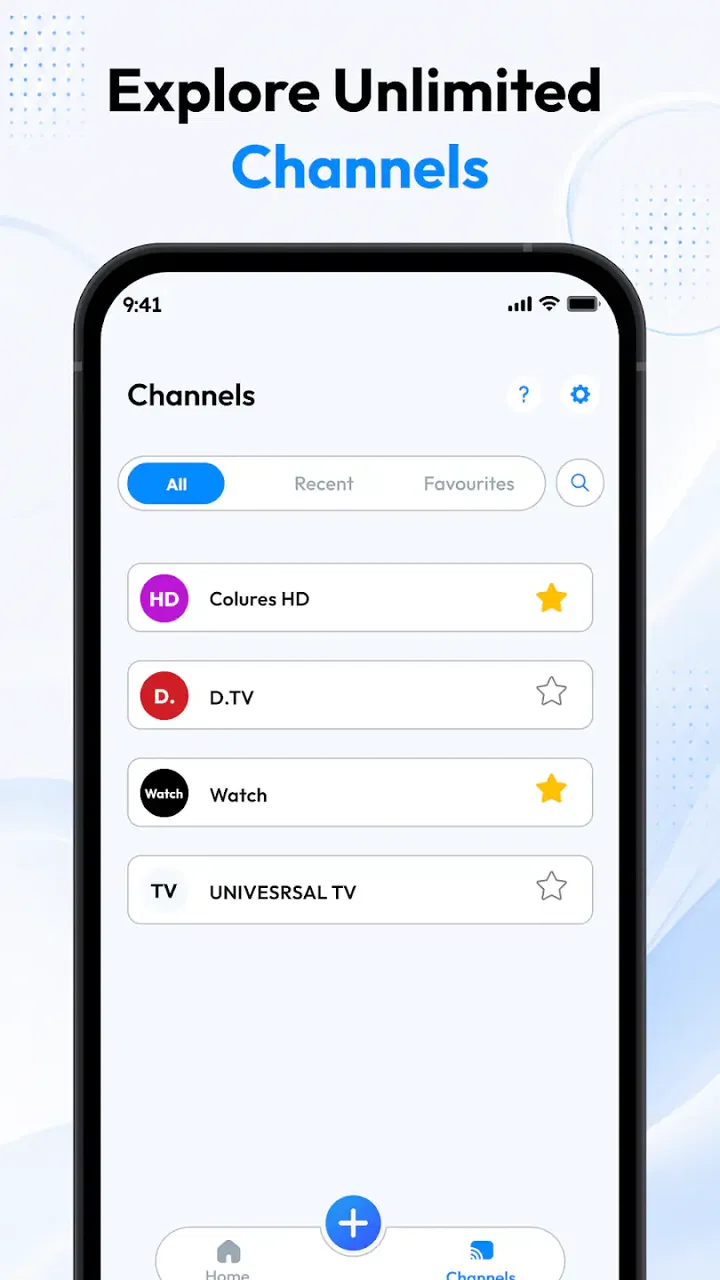
I approached Pro IPTV: Online & Live Player as a practical video player rather than as a source of television content. That distinction matters from the first minute: the app is designed to play IPTV playlists, while the channels, films, and series you watch depend on the M3U or M3U8 playlist you bring to it. In my experience, that makes it most interesting for people who already have a legitimate playlist and want a focused way to organize playback on an Android device.
It sits in the video players and editors category, comes from Vexora Apps, and is free to install. The store describes it as a player for IPTV playlists with M3U and M3U8 support, including movies and series. I found that positioning refreshingly direct. It does not ask the app itself to be a television service; instead, it gives your playlist a place to play. If you are expecting a catalog of channels ready to watch, this is an important difference to understand before installing.
How Pro IPTV fits into everyday viewing
The simplest way to picture the app is as a bridge between a playlist and your screen. M3U and M3U8 files are commonly used to organize streaming entries, and a compatible player can read those entries and present them for playback. That is the core reason to choose this app: you have a source already, and you want a dedicated player instead of opening individual streams one by one.
You May Also Like

 Blood Strike: 2.5 Anniversary
Blood Strike’s Loadouts Turn Every Drop Into a Tactical Gamble
A close look at Blood Strike’s custom loadouts: how fast access to signature weapons reshapes its battle royale rhythm, rewards preparation, and narrows the gap between fights.

 Pandora - Music & Podcasts
Pandora’s Music Is Easy to Start, but Harder to Recover
Pandora’s strength is its low-effort path from a seed to a station. Its weak spot is how much confidence it asks you to place in connection, setup, and quiet recovery.

 8 Ball Pool
 Is Built on Rivalries, Rematches, and Routine
A close look at the rivalries, rematches, shared routines, and unanswered safety questions that turn a quick pool match into a persistent mobile community.

 Samsung Music
’s Quiet Strength Is Playing What You Already Own
Its reach comes less from spectacle than from dependable access to a personal library. That simplicity is both the app’s strongest retention engine and its ceiling.

 AccuWeather: Weather Radar
AccuWeather Review: A Quick, Clear Forecast for Everyday Decisions
For everyday plans, the best forecast is the one you can understand quickly. AccuWeather makes rain timing, radar, and local conditions easy to act on, with a few trade-offs.

 Hill Climb Racing
Why Hill Climb Racing Still Turns Crashes Into One More Run
A tiny car, a bumpy hill and one more upgrade: Hill Climb Racing keeps resurfacing because its simple chaos makes every near-miss feel personal.
More From Our News Desk



A realistic everyday use case would be watching a personal or authorized IPTV playlist at home after work. Rather than searching through separate video apps, I would open the player, load the playlist, and use the resulting channel or program entries as the viewing starting point. The same approach can suit someone who maintains different playlists for live channels, films, and series, provided those playlists are valid and legally obtained.
The app is also a reasonable fit for people who prefer a lightweight viewing workflow. A general media player may support many file formats and local playback options, but that breadth can make IPTV setup feel secondary. Here, playlist playback is the central purpose. That focus is useful when your main task is opening an M3U or M3U8 source and moving through its entries.
At the same time, I would not confuse a player with a provider. Installing it does not automatically give you channels, subscriptions, or a library of entertainment. The quality of the experience depends heavily on the playlist: broken entries, unavailable streams, missing artwork, or incomplete program information can still affect what you see, regardless of which player you use.
What the free price really means
The app is free, so the basic decision is not whether its purchase price beats another paid player. The more useful question is whether it saves you enough setup effort to deserve space on your device. Since there is no purchase cost to weigh here, its value comes from how conveniently it handles compatible IPTV playlists and whether that workflow matches your habits.
I would describe the free access as an opportunity to test fit rather than a promise of unlimited television. You can try the player without committing money, but you still need an appropriate playlist and a stable source. That makes the app potentially good value for an existing IPTV user, while offering little practical value to somebody who has no playlist to load.
There is also an important distinction between free software and free content. The app’s price covers access to the player, not the rights to every stream that might appear in a playlist. I would only use playlists from providers or sources I am authorized to access. That keeps expectations realistic and avoids treating the player as a shortcut around legitimate subscriptions or distribution rights.
Where the app delivers useful value
The strongest value is concentration. Instead of treating every stream as a separate task, you can use a playlist-oriented player for a collection of entries. That is especially helpful when your viewing is spread across live television, films, and series and you want one place to begin playback. The M3U and M3U8 support is the practical feature that makes this possible.
Another useful point is separation between content source and playback tool. If you change a legitimate playlist provider, a dedicated player can remain part of your routine rather than forcing you to learn an entirely different viewing method. This is a small but meaningful advantage for users who like to keep their playback habits stable while their source lists change.
I also see value for people who do not want a full entertainment ecosystem. Many mainstream video services are built around recommendations, accounts, subscriptions, and their own catalogs. Those are excellent features when you want discovery, but they are unnecessary if you already know exactly which playlist you want to watch. Pro IPTV: Online & Live Player is more appealing in that narrower situation because its purpose is closer to playback than to content discovery.
A practical tip is to keep your playlists organized before importing them. Separate lists for live channels, films, and series can make navigation less frustrating than putting everything into one long collection. This is not a special feature claim; it is a workflow choice that takes advantage of the way playlist-based viewing works. Clear naming at the source can save more time than repeatedly searching inside the player.
Another useful habit is to test a small, known-good playlist first. If playback works there, you have a better basis for deciding whether a larger list is the problem. If a stream fails, the cause may be the entry or the source rather than the player. Separating those possibilities prevents you from abandoning the app after one unreliable channel.
Tradeoffs you should understand before relying on it
The biggest tradeoff is dependence on external playlist quality. A player can open compatible entries, but it cannot make an unavailable stream available. If your provider changes addresses, removes channels, or supplies incomplete entries, you may experience interruptions or confusing results. This is the central limitation of the category, and it matters more than cosmetic preferences when deciding whether the app suits you.
Playlist management can also be less familiar than the polished browsing systems used by major streaming platforms. Someone accustomed to selecting a title from a large, searchable catalog may find IPTV lists less tidy, particularly when names are inconsistent or categories are poorly arranged. I would choose this app for control over a personal playlist, not for the smoothest possible content discovery.
There is a second tradeoff in troubleshooting. With a mainstream streaming service, playback problems usually lead to a single support path. With an IPTV player, you may need to determine whether the issue comes from the playlist format, the stream address, the provider, the network, or the app. That extra responsibility is acceptable for technically comfortable users, but it can become annoying for anyone who wants everything managed automatically.
I would also avoid assuming that support for M3U and M3U8 guarantees identical results for every playlist. These formats can contain different kinds of entries and metadata, and sources may be structured in different ways. A list that opens cleanly for one user may still contain entries that behave differently from others. The sensible approach is to judge the app using the playlists you actually intend to use.
The current version is 1.0, which makes me cautious about building my entire viewing routine around it immediately. That version detail does not tell me that the app is unreliable, but it does encourage a gradual approach: test your essential playlists, confirm that the playback workflow feels comfortable, and keep an alternative available if uninterrupted access is important to you.
Who is most likely to get good value?
I think the best audience is an IPTV user who already has lawful M3U or M3U8 playlists and wants a dedicated Android player. The app’s free price lowers the barrier to testing, and its focused purpose may feel cleaner than using a general-purpose video application. It is particularly suitable for someone who understands that playlist maintenance is part of the experience.
It can also work for a household member who wants a straightforward place to play an existing list without adopting a full streaming subscription ecosystem. In that situation, the key is preparing the playlist properly and explaining that the app plays the supplied streams; it does not replace the source that provides them.
The app is less suitable for somebody starting from zero. If you do not have a legitimate playlist, the installation alone will not give you a ready-made selection of channels, films, or series. A conventional streaming service may be a better choice for you because it combines licensed content, search, recommendations, and account-based access in one package.
I would also steer very casual viewers toward a mainstream alternative if they dislike troubleshooting. The dedicated IPTV route rewards patience and organization, but it is not automatically simpler just because the player is focused. People who want one polished catalog, predictable availability, and minimal playlist maintenance may value a different kind of app more.
Android compatibility and practical expectations
The app requires Android 8.0 or later, so compatibility is tied to the operating system rather than to a particular phone model. Before installing, I would check the Android version on an older spare device, especially if that device is being considered as a dedicated television player. On a supported device, the more important test is whether your own playlists load and play as expected.
The age rating is Everyone, which makes the listing broadly accessible from a content-rating perspective. That should not be confused with a guarantee that every stream inside a playlist is suitable for every viewer. The player’s rating and the content supplied through a playlist are separate considerations, so I would still review the source and the entries used by your household.
The app has passed the one-million-install mark and holds an average rating of 4.1 from around one thousand ratings. Those figures suggest that it has attracted a meaningful audience, but they do not replace personal testing. IPTV experiences vary so much by playlist and source that your own setup is a better indicator than popularity alone.
For a first test, I would use a playlist containing a few reliable entries rather than importing every list at once. Check whether the names are understandable, whether switching between entries feels manageable, and whether the streams you care about actually start. This staged approach makes it easier to identify a source problem and avoids turning the first session into a long troubleshooting exercise.
My recommendation after weighing the tradeoffs
I would recommend Pro IPTV: Online & Live Player to a specific kind of friend: someone who already has authorized IPTV playlists and wants a free, focused way to play them on Android. For that person, the app’s value is clear because it addresses a defined task without requiring a paid purchase. The support for M3U and M3U8 gives the player a practical role in a playlist-based viewing setup.
I would not recommend it as a replacement for a streaming catalog. If your priority is discovering shows, receiving a complete library, or avoiding all playlist maintenance, another video service will probably be a better fit. The app cannot remove the responsibilities that come with external streams, and its focused design is an advantage only when that focus matches what you need.
My final verdict is therefore conditional but positive: free access makes it worth testing, not blindly depending on. Start with a small, legitimate playlist, confirm that your important streams work, and decide whether the organization feels comfortable. If your viewing already revolves around M3U or M3U8 sources, this player has a sensible place in your toolkit. If you want content, recommendations, and reliability handled in one polished package, skip it and choose a service built around those priorities instead.
FAQs for Pro IPTV: Online & Live Player
01What is Pro IPTV: Online & Live Player, and how does it work?
Pro IPTV: Online & Live Player is a media player designed to stream television channels and other video content through IPTV playlists. It does not usually provide channels by itself; instead, you add a compatible M3U playlist, Xtream Codes account, or another supported source from your IPTV provider. The app then organizes the available channels and lets you watch them over an internet connection.
02Does Pro IPTV: Online & Live Player include live channels or subscriptions?
The application should be considered a player rather than a television service. In most cases, it does not include a built-in channel package, premium subscription, or guaranteed access to live broadcasts. You are responsible for obtaining a legal IPTV subscription or playlist from a legitimate provider. Channel availability, video quality, program information, and reliability depend mainly on the source you connect to the app.
03Is Pro IPTV: Online & Live Player free to download and use?
The download may be free, but some features can depend on the app’s current version, advertising model, or optional premium upgrades. Your IPTV provider may also charge a separate subscription fee for access to channels and content. Before paying for anything, check the application’s store listing and review the provider’s terms carefully. Avoid services promising unauthorized premium channels at unusually low prices.
04What internet connection and devices are recommended for smooth playback?
A stable broadband or mobile-data connection is important for reliable IPTV streaming. Standard-definition channels generally require less bandwidth, while HD and 4K streams need faster internet and a stronger Wi-Fi signal. Playback can also be affected by provider-server performance, device hardware, network congestion, and video format. If streams buffer, try reducing video quality, moving closer to the router, or testing another legitimate playlist.
05Is it legal and safe to use Pro IPTV: Online & Live Player?
The player itself can be used legally, but the legality of the content depends on the playlist or IPTV service you add. Use only providers that have permission to distribute their channels and programs. For safety, download the app from an official store or trusted source, check requested permissions, avoid suspicious playlists, and never share account credentials unnecessarily. Also remember that third-party streams may contain privacy, advertising, or reliability risks.
Pros
- Supports multiple playlist formats for flexible IPTV setup.
- Clean interface makes channel browsing quick and straightforward.
- Includes an electronic program guide for supported services.
- Playback controls allow pausing
- seeking
- and switching channels easily.
- Works well with many modern phones
- tablets
- and streaming devices.
Cons
- It does not provide TV channels or subscriptions by itself.
- Performance depends heavily on playlist quality and internet speed.
- Some advanced features may require an in-app purchase.
- Certain streams may fail because of provider restrictions or broken links.
- Background playback and casting support may vary by device.

Pro IPTV: Online & Live Player
Gallery